Home Office Boundaries in Shared Spaces
A desk audit for home office boundaries in shared spaces, focused on comfort, recovery time, shared-work constraints, and the details that reduce Monday-morning friction.
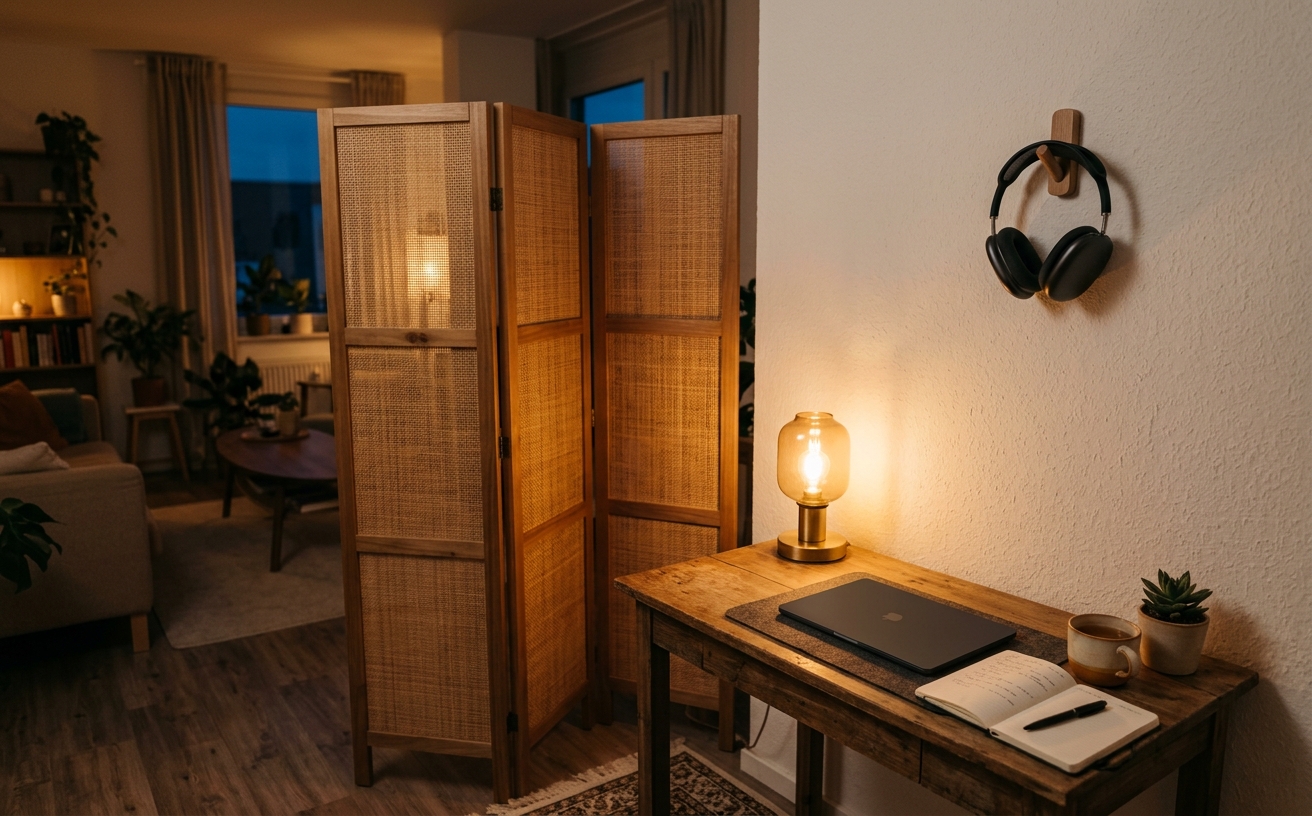
Establishing a functional workspace in a shared living area requires more than a desk and a laptop stand; it demands a systematic approach to physical and psychological boundaries. When your dining room doubles as a conference room, or your bedroom corners host deep focus blocks, the friction of transitioning between professional and personal modes compounds daily. This decision guide examines how to implement structural, acoustic, and visual boundaries that hold up to repeated use. Whether you are returning from a travel day, wrapping up back-to-back video calls, or simply trying to reclaim your living room on a Friday evening, the goal is to create a workspace that allows you to engage deeply when required and detach completely when the workday concludes.
Visual Demarcation and Sightlines
The foundation of a shared workspace relies on controlling sightlines. A desk placed haphazardly in a living room forces the brain to process residential clutter—like a kitchen sink or a television—during work hours. Conversely, seeing a glowing monitor from the sofa prevents mental detachment after hours. Strategic orientation is the first boundary. Position the desk so the primary seated sightline faces a wall, a window, or a dedicated bookshelf, physically turning your back on the domestic environment.
When physical orientation is restricted by floor plans, directional lighting serves as a highly effective visual boundary. Relying on overhead room lighting blends the workspace into the living space. Implementing a dedicated monitor light bar and an articulating desk lamp creates a localized pool of light. When these task lights are illuminated, the zone is active. When they are switched off, the room's ambient lighting takes over, visually receding the desk into the background.
Hardware visibility dictates the permanence of the office. If cables, docks, and external drives are permanently scattered across a surface, the room remains an office regardless of the time. Utilizing closed storage, such as a residential-styled credenza or a rolling drawer unit, allows you to hide the machinery of work. Cable management systems and under-desk mounts for power strips ensure that the mechanical underbelly of the desk remains invisible from the rest of the room.
Acoustic Isolation in Open Floor Plans
Sound remains the most difficult boundary to enforce in an open-concept home. It is crucial to distinguish between soundproofing, which requires structural construction, and acoustic treatment, which manages sound wave reflection. For repeat use in a shared space, active noise-canceling headphones are the baseline requirement for the worker. However, wearing headphones does not solve the disruption caused by your own voice during repeated video calls or phone meetings.
To mitigate outbound noise, utilize strategic furniture placement to break up sound waves. Hardwood floors and bare drywall amplify voice projection, making a corner desk sound like a busy terminal. Introduce heavy textiles, thick area rugs, and bookshelves filled with varying sizes of books around the desk perimeter. These elements absorb high-frequency vocal echoes, deadening the sound before it travels across the living room or down the hallway.
Microphone selection is equally critical for boundary management. Relying on a laptop's built-in microphone captures the entire room's audio, broadcasting household background noise to clients and colleagues. Deploying a dynamic microphone or a headset with a highly directional, noise-rejecting boom arm ensures that only audio within a few inches of the capsule is transmitted. This creates a digital acoustic boundary, isolating your professional presence from the shared physical environment.
The Frictionless Teardown and Setup
A boundary is only effective if it can be maintained without exhaustion. If clearing the desk at the end of the day takes ten minutes of unplugging and wrapping cables, the habit will inevitably fail. Designing for repeat use requires minimizing setup friction. A single-cable docking solution is mandatory. Routing monitors, peripherals, and power through a Thunderbolt or USB-C dock means transitioning from deep work to a clean surface requires unplugging exactly one cable.
Establishing a dedicated landing zone for the daily carry completes the teardown process. When the workday ends, the laptop, notebook, and headset must have a specific, hidden home. This might be a designated drawer, a closed folio, or a vertical laptop stand tucked behind a primary monitor. The physical act of stowing the machine serves as a psychological trigger, signaling the definitive end of the workday and returning the shared space to its primary residential function.
Analog tools require similar containment strategies. When a dining table must serve as a temporary workstation, loose papers and pens create immediate friction. Utilizing a rigid work tray or a large, structured desk mat allows you to consolidate the entire analog operation. When it is time to clear the table for dinner, you simply lift the tray and slide it onto a nearby shelf in a single motion, preserving the integrity of the shared room.
Establishing Temporal Boundaries
Physical and acoustic boundaries will fail without the enforcement of temporal boundaries. In a shared household, communicating availability is paramount. Because you are physically present, family members or roommates may assume you are accessible. Implementing passive indicators prevents constant interruptions. A specific red desk lamp, a closed room divider, or even a physical object placed on the edge of the desk can serve as a clear, non-verbal signal that a deep focus block is in progress.
Without a physical commute, the brain requires a transition ritual to switch between professional and personal modes. This routine must be deliberate and repeatable. Booting up the system, filling a water carafe, and adjusting the chair serve as the morning commute. Conversely, shutting down the operating system, turning off the master power strip, and pushing the chair flush against the desk serve as the evening departure. Skipping this ritual blurs the line between modes.
Managing the temptation to check work after hours is particularly difficult when the desk is located in the living room. To combat this, introduce micro-barriers of friction. Disconnecting the primary monitor cable from the dock, or closing the laptop lid and placing it in a sleeve, forces you to take multiple physical steps to resume work. This intentional friction interrupts the automatic habit of checking email while watching a movie.
Ergonomic Compromises and Solutions
Shared spaces often tempt professionals into ergonomic compromises, such as working from a sofa or a dining chair. While acceptable for a thirty-minute email triage, these setups cause physical degradation during repeat use and long focus blocks. Investing in a highly adjustable ergonomic chair is non-negotiable, but it must fit the room's aesthetic. Selecting chairs with refined profiles, muted colorways, and aluminum bases allows the equipment to blend into a living room without looking like a corporate cubicle.
Desk depth is frequently sacrificed in shared spaces, with apartment-sized desks often measuring only twenty inches deep. This creates severe eye strain when using external monitors. To reclaim this depth, utilize heavy-duty monitor arms. Clamping the arm to the back edge of the desk allows the screen to hover over the rear boundary, effectively making a shallow desk function like a deeper one. The arm also permits pushing the screen entirely out of the way when the surface is needed for non-digital tasks.
Mobility ensures the workspace can adapt to the changing demands of a multi-use environment. Equipping the desk and chair with high-quality, hard-floor caster wheels provides necessary flexibility. This allows you to pivot the desk away from a window to avoid harsh afternoon glare, or to slide the entire workstation into a corner when hosting guests. A mobile setup acknowledges that a shared space is dynamic, allowing the office to expand when needed and contract when not.
Decision checklist
- Install a single-cable Thunderbolt or USB-C dock to reduce daily setup and teardown friction.
- Assign a closed storage drawer or vertical stand specifically for stowing the laptop after hours.
- Position your desk so your voice projects toward an exterior wall or acoustic panel, not the open room.
- Route all peripheral cables through an under-desk tray to eliminate visual clutter from the living area.
- Establish a physical indicator, such as a specific task light, to signal focus periods to others in the space.
Who should skip this
Professionals who have a dedicated, walled-off room exclusively for work with a door that closes can bypass these strategies. If your workspace does not overlap with your living, sleeping, or dining areas, the strict visual and acoustic teardown routines detailed here will add unnecessary friction to your day. This guide is specifically engineered for those navigating the overlapping demands of multi-use environments.
Maintenance note
Maintaining boundaries in a shared space requires a strict end-of-day reset protocol. Every Friday afternoon, clear the desk surface entirely, wipe down peripherals, and ensure all cables remain tightly managed in their trays. Inspect your closed storage solutions monthly to purge accumulated paper or obsolete tech, ensuring your quick-stow drawers do not become permanent junk repositories that hinder your daily teardown routine.
The Connected Desk is an independent editorial publication. We may earn a commission when you purchase through links on our site. We do not accept compensation for product placements, and our recommendations are based entirely on long-term utility and structural reliability in professional environments.
FAQ
How do I manage video call backgrounds in a shared living room?
Position your desk so the camera faces a blank wall, a bookshelf, or a corner, rather than the open expanse of the room. If the layout dictates facing the room, use a collapsible room divider placed directly behind your chair during calls. This physically blocks household traffic from the frame and provides a consistent, professional backdrop.
What is the most effective way to block household noise without structural changes?
Combine active and passive solutions. Wear a high-quality headset with active noise cancellation for your own focus, and ensure it utilizes a directional, noise-rejecting boom microphone so your clients do not hear background household noise. Add heavy rugs and dense furniture around the desk to dampen ambient room echo.
Can a dining table serve as a permanent workstation?
It can, but it requires rigorous discipline regarding setup and teardown. Use a structured work tray or a large desk mat that holds your keyboard, mouse, and analog tools. This allows you to physically lift and remove the entire workspace in one motion when it is time to transition the table back to dining.
How can I hide a large monitor in a bedroom office?
If you cannot use a credenza or armoire to conceal the screen, focus on minimizing its visual weight. Mount the monitor on an articulating arm so it can be pushed flat against the wall when not in use. Turn off all standby LEDs, and route cables inside the wall or through a rigid cable spine so the setup looks intentional and clean.