Deep Work Rituals After Team Standups
A desk audit for deep work rituals after team standups, focused on comfort, recovery time, shared-work constraints, and the details that reduce Monday-morning friction.
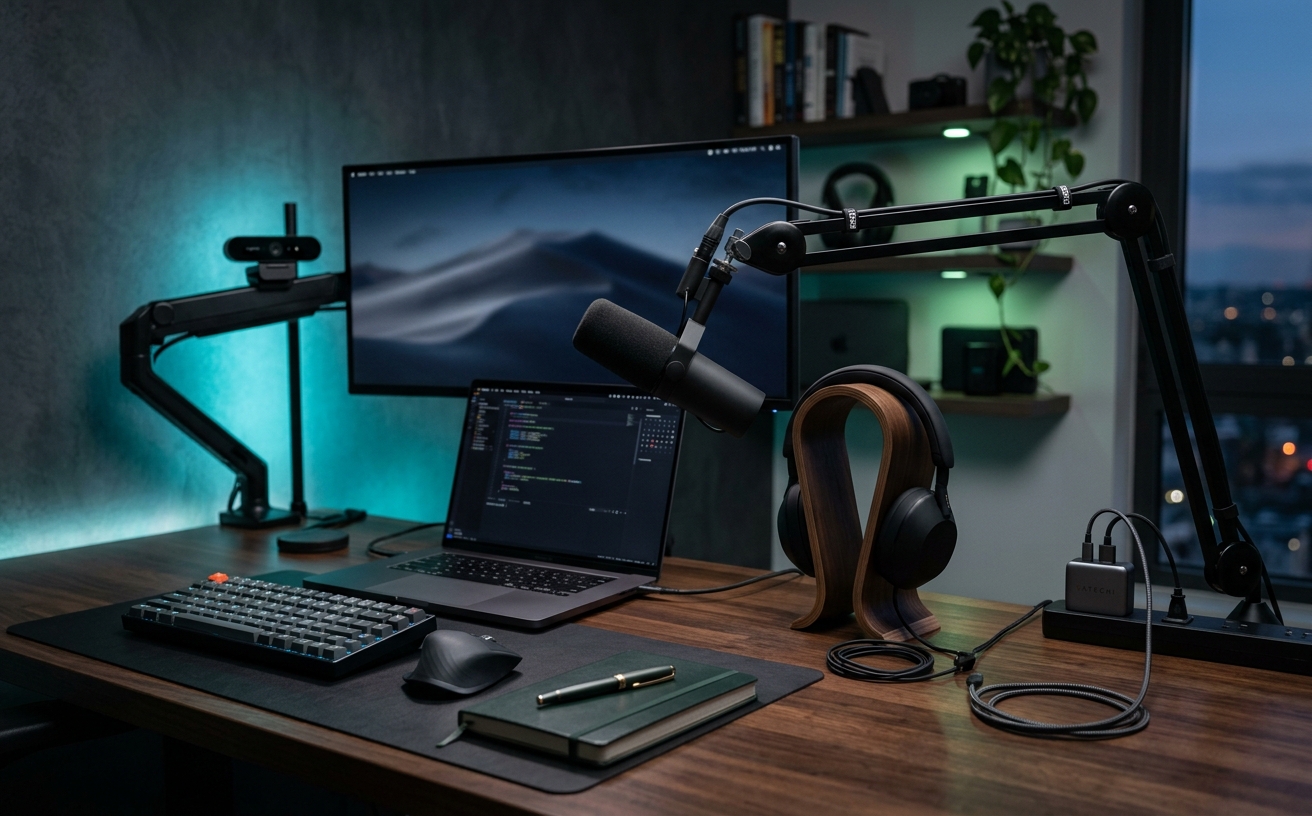
The daily team standup is inherently reactive. For fifteen to thirty minutes, your cognitive load is fractured across status updates, blockers, and cross-departmental cross-talk. When that video call ends, the expectation is often an immediate pivot into high-value, concentrated deep work. In a spacious corporate office, this transition is physical: you walk out of the conference room, grab a coffee, and return to your desk. In a small apartment, however, your conference room, cafeteria, and focus cave are the exact same thirty-six inches of desk space. Without the architectural boundaries of a traditional office, remote workers in compact environments must manufacture their own context shifts. Establishing a deliberate post-standup ritual is the only reliable way to clear the residual adrenaline of a team meeting and signal to your brain that the reactive phase of the morning has concluded.
The Sensory Pivot: Ambient Alterations vs. Audio Masking
Because you cannot change rooms in a studio apartment, you must change how the room feels. The sensory pivot relies on altering the light and sound of your workspace the moment the standup concludes. During a video call, your environment is typically optimized for camera visibility—ring lights are active, overhead lights are on, and the space is illuminated to eliminate shadows. Leaving this bright, broadcast-ready lighting active during deep work sustains a low-level feeling of being on stage, which is counterproductive to deep focus.
Comparing lighting strategies, the most effective small-space transition involves plunging the periphery into shadow. Turning off the overhead room light and the webcam key light, and activating a monitor light bar or a low-angled desk lamp, physically shrinks your perceived environment. By bringing the light source down and restricting it entirely to the desk surface, you create a visual boundary that blocks out the laundry basket or the kitchen sink just a few feet away. This sharp contrast between the broadcast lighting of the standup and the localized task lighting of the focus block serves as a powerful psychological trigger.
Audio masking serves as the second half of this sensory transition. While open-air speakers are comfortable for listening to colleagues during a standup, leaving the room silent afterward invites distraction from street noise or building neighbors. Switching to over-ear, active noise-canceling headphones immediately after the call creates a closed audio loop. Playing a consistent, non-vocal track—such as brown noise or low-bpm instrumental music—acts as an auditory wall, replacing the unpredictable cadence of human conversation with a predictable, isolating frequency.
Ergonomic Reset: Posture Shifts vs. Hardware Repositioning
Physical stagnation is a primary enemy of focus in a small workspace. Sitting in the exact same position for a morning standup and the subsequent deep work block blurs the boundary between the two activities. An ergonomic reset forces a physical acknowledgement that the work mode has changed. For those with height-adjustable desks, the most straightforward comparison is the sit-to-stand transition. Taking the standup in a seated position and raising the desk to a standing position for the first hour of deep work—or vice versa—forces a change in blood flow and physical engagement.
However, not all small spaces can accommodate a standing desk. In static setups, the transition must occur through hardware repositioning. During a video call, monitors are typically pushed back to allow the webcam a wider field of view, and the keyboard is often pulled forward to allow for quick typing in chat windows. Reversing this geometry is a highly effective ritual. Pushing the keyboard away, pulling the primary monitor significantly closer, and physically angling the screen downward creates a closed, cockpit-like environment.
This hardware repositioning extends to secondary devices. If you use a laptop as a secondary screen for Slack or Zoom during the standup, the physical act of closing the laptop lid is the ultimate small-space transition. By eliminating the secondary screen entirely, you remove the peripheral temptation of incoming messages and force your physical posture to center exclusively on the primary monitor. This physical narrowing of the workspace dictates a narrowing of cognitive focus.
Palate Cleansers: Digital Scrubbing vs. Analog Anchoring
The digital debris left behind by a morning standup is toxic to deep work. Your screen is likely littered with a video conferencing window, a team chat application, a shared project management board, and several browser tabs referenced during the call. Attempting to write a complex document or audit a codebase with these applications visible in the background guarantees distraction. The digital scrubbing approach requires a strict, one-minute routine of closing every application that is not strictly necessary for the immediate task.
A more robust digital transition involves utilizing virtual desktops or dedicated browser profiles. Instead of manually closing and minimizing windows, you swipe to a completely separate virtual desktop that contains only your code editor or writing software. This approach is highly efficient but requires discipline, as the communication tools are still running and accessible with a single trackpad gesture. The risk in a small space, where physical boundaries are weak, is that weak digital boundaries will also fail.
Comparing this to analog anchoring reveals why physical tools remain highly relevant in compact tech setups. Instead of immediately opening a new software window after the standup, the analog approach involves pushing the keyboard aside and opening a physical notebook. Spending five minutes writing down the specific objective for the deep work block on paper breaks the screen hypnosis induced by the video call. In a small apartment, this tangible, offline interaction provides a necessary cognitive pause, grounding the worker in the physical space before they dive back into the digital one.
The Micro-Commute: External Routes vs. Internal Reorientation
The concept of the commute is functionally dead for remote workers, but its psychological utility—providing a buffer between different states of being—is sorely missed. When your desk is in your bedroom, you must invent a micro-commute to separate the collaborative morning from the isolated afternoon. The external micro-commute is the most literal interpretation: the moment the standup ends, you leave the apartment. Walking around the block, taking the dog out, or simply walking to the lobby to check the mail forces a complete change of scenery.
Returning to the desk after this brief excursion simulates the feeling of arriving at the office ready to execute. However, external micro-commutes are vulnerable to weather, time constraints, and building layouts. When leaving the apartment is impractical, you must rely on internal reorientation. This requires utilizing the limited square footage of your home to create distance. Moving from the desk to the kitchen counter to pour a glass of water, or sitting on the sofa for three minutes to stretch, breaks the spatial continuity.
Even if your small space precludes moving to another piece of furniture, you can execute a micro-commute simply by turning your chair 180 degrees away from the monitors. Facing the opposite wall, closing your eyes, and taking ten deliberate breaths before turning back to the desk provides a distinct, measurable break in the morning routine. It is a deliberate refusal to let the energy of the standup bleed directly into the requirements of the deep work block.
Buffer Strategies: Hard Boundaries vs. Fluid Ramps
A common point of failure in remote work schedules is the assumption that deep work can begin at 9:31 AM if the standup ends at 9:30 AM. Human cognition does not operate on a toggle switch. Comparing buffer strategies is essential for finding a sustainable rhythm. The hard boundary method involves scheduling a mandatory fifteen-minute block immediately following the standup dedicated entirely to triage. During this time, you answer urgent questions raised on the call, send requested links, and update ticket statuses.
Once that fifteen-minute timer expires, communication applications are closed, and the deep work block begins. This prevents the anxiety of unfulfilled minor tasks from lingering in the back of your mind while you attempt to focus. Conversely, the fluid ramp method acknowledges that some days require an immediate start on a major project. Instead of a triage block, the fluid ramp involves starting the deep work session with a low-friction, mechanical task directly related to the core project.
For a developer, this might mean spending the first ten minutes formatting code or reviewing documentation before writing new logic. For a writer, it might mean organizing notes or formatting headers before drafting original paragraphs. In a small workspace where you cannot rely on the environmental cues of a library or a quiet room to induce focus, using a low-stakes mechanical task acts as a flywheel, slowly building the momentum required for heavy cognitive lifting without demanding peak performance the second the video call disconnects.
Decision checklist
- Clear the physical desk surface of any notes, pens, or mugs used during the morning standup.
- Switch your primary monitor to a dedicated virtual desktop that entirely excludes team chat and email clients.
- Change the color temperature of your task lighting from daylight to a warmer tone to visually signal a shift in pace.
- Put on over-ear headphones with a pre-selected instrumental playlist before opening your primary project file.
- Write your single primary objective for the next focus block on a physical sticky note and place it on your monitor bezel.
Who should skip this
Professionals whose roles are inherently reactive—such as IT support dispatchers, social media community managers, or emergency logistics coordinators—will find rigid deep-work transitions counterproductive. If your core metric is response time rather than sustained focus, attempting to wall off your environment post-standup will only create operational bottlenecks and personal frustration. These rituals are designed for roles requiring prolonged, uninterrupted concentration.
Maintenance note
Ritual fatigue is a genuine risk when implementing strict workspace transitions. Review your post-standup routine every quarter to ensure the steps still serve your focus rather than acting as elaborate procrastination. If adjusting your monitor arm, changing your lighting, and brewing a specific tea starts taking twenty minutes instead of five, strip the ritual back to a single, reliable trigger, such as putting on headphones or closing your laptop lid.
The Connected Desk is a reader-supported publication. When you purchase workspace accessories, lighting, or ergonomic equipment through the links in our editorial guides, we may earn a commission. This independent funding model allows us to maintain strict editorial standards and avoid sponsored content placements.
FAQ
How long should the transition between a standup and deep work take?
A functional transition should take no longer than five to ten minutes. The goal is to create a distinct psychological boundary and clear digital clutter, not to invent a new category of busywork that delays your core tasks.
What if my small apartment doesn't have a door to close for deep work?
Rely on sensory boundaries instead of architectural ones. Noise-canceling headphones, a targeted desk lamp that darkens the rest of the room, and a strictly enforced digital status serve as a highly effective virtual door.
Should I leave my webcam on or off during the transition period?
Unplug or physically cover your webcam immediately after the standup. Removing the subconscious feeling of being observed or available on video is a critical step in shifting from a collaborative to an independent mindset.
How do I handle urgent messages that come up right at the end of the standup?
Address them during a dedicated five-minute triage window immediately following the call. Reply with a timeline for your full response, then close the communication application completely before beginning your deep work block.